This blog is created by Om Nanotech Pvt. Ltd., the manufacturer, Supplier & Exporter of ZIPMEM / AUM Computer Memory Modules. Here you can find all the important information that is related to Computer Memory Modules and RAM. You can also find information on where and how should you choose to buy best Computer Memory, USB Pen Drives, Memory Cards and other Memory Storage Products.
Which DDR RAM Should be Used for Computer
Best RAM Solutions
One cannot think of performing this kind of a function in the system without adequate RAM in PC. However the main question is as to how much RAM is pertinent? In terms of RAM the more you have in your system the better it is for its performance, however it so highly recommended that you should at least have 2GB RAM in your system. Though there are people who even work on 256MB RAM but probably their functionalities are simply limited to using the Microsoft Word applications or may be just to browse the internet a few times.
In that case it is not very essential to go in for extensive amount of RAM. However, in case you want to use your system for other things then it would be mandatory to upgrade your system with RAM so that there is adequate amount of RAM. However while doing so; it has to be ensured that the RAM used is of a good quality and from reliable sources only. One should be watchful about the companies that you buy RAM from as there are many spurious and counterfeit companies that are out to make good profits on each transactions that they do.
How to Buy a Laptop without spending a fortune
Processor: It is ideal to buy a laptop with dual processor, with at least 2.4 GHz and above performance. If you choose a slower processor, it is not really worth the cost as there would be lot of compromises in terms of performance and it would impact the workability of the same. It is recommended to go in for Intel Core 2 Duo 2.4Ghz
RAM: RAM is going cheaper each day, and it is always recommended to have more of it than less to increase the efficiency of your system, SDRAM 1GB RAM is not recommended as there should be at least 2GB DDR2 SDRAM in the system, Though you can also opt for 3GB or 4GB RAM as well.
Graphic Card: If you are to use your laptop for gaming purposes, it is highly recommended that you go in for a dedicated graphic card with high memory so that there is no RAM sharing with the computer so as to compromise on the speed and effectiveness of system performance.
Hard Disk: It is mandatory to have at least 160 GB free hard disk space, besides the free space it is also important to have faster transfer data facility in the hard drive.
Screen: Having a huge big screen can add to the experience of games. Therefore you can invest in 15-17” monitor with high Definition screen output.
These guidelines can not only help you to purchase a good gaming laptop, rather it can also help you to perform the mundane tasks with ease and comfort!
How to boost your PC’s performance
Purchasing RAM for Your Computer: Watch Out for Prices!
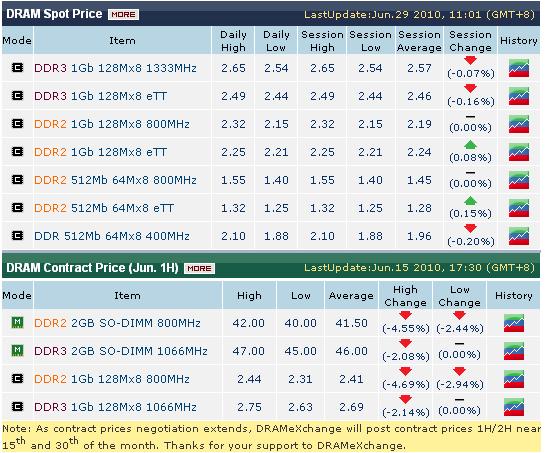
Price of Memory Modules (OEM Computer RAM) As On 29th June 2010
T/T (Singapore) D/D (India) RTGS (India) For further information, please send in your mail to it@om-nanotech.com or visit our website www.om-nanotech.com |
Price of Memory Modules (OEM Computer RAM) As On 28th June 2010
T/T (Singapore) |
Price of Memory Modules (OEM Computer RAM) As On 26th June 2010
T/T (Singapore) D/D (India) RTGS (India) For further information, please send in your mail to it@om-nanotech.com or visit our website www.om-nanotech.com |
Price of Memory Modules (OEM Computer RAM) As On 24th June 2010
T/T (Singapore) D/D (India) RTGS (India) For further information, please send in your mail to it@om-nanotech.com or visit our website www.om-nanotech.com |
Price of Memory Modules (OEM Computer RAM) As On 23th June 2010
T/T (Singapore) D/D (India) RTGS (India) For further information, please send in your mail to it@om-nanotech.com or visit our website www.om-nanotech.com |
Price of Memory Modules (OEM Computer RAM) As On 22th June 2010
T/T (Singapore) D/D (India) RTGS (India) For further information, please send in your mail to it@om-nanotech.com or visit our website www.om-nanotech.com |
Price of Memory Modules (OEM Computer RAM) As On 21th June 2010
T/T (Singapore) D/D (India) RTGS (India) For further information, please send in your mail to it@om-nanotech.com or visit our website www.om-nanotech.com |
Price of Memory Modules (OEM Computer RAM) As On 18th June 2010
Memory Modules (Computer RAM) Price at Om Nanotech Private Limited, as on 18.06.2010.
T/T (Singapore) |
Price of Memory Modules (OEM Computer RAM) As On 17th June 2010
Today's Hot Offer DDR3 2GB SODIMM 256X8 @ 31.85 Contact Now to get best Deal.
T/T (Singapore) D/D (India) RTGS (India) For further information, please send in your mail to it@om-nanotech.com or visit our website www.om-nanotech.com |
Price of Memory (Computer RAM) As On 12th JUNE 2010
T/T (Singapore) |
Motherboard And Computer RAM Should Be Compatible With Each Other

It is always a very good idea to upgrade the computer RAM rather than allowing the system to swap and store the data in the hard disk. Swapping will hamper the performance of the system as computer cannot access the data of the hard drive as fast as it does in RAM. But before upgrading the RAM of the computer, it is always advisable to check compatibility of motherboard and also the requirement of the user as well as system (number of RAM that can be used).
It is important to know the compatibility of motherboard, the system will not boot unless the RAM is compatible with the motherboard. Compatible of motherboard can be checked through various ways like; online websites of RAM supplier, motherboard company's instruction manual, checking old computer RAM that was being used earlier. Beside, computer RAM should be install with the help of some expert, unless the RAM is fixed in proper way it will not work.